
Table of Contents
OpenCart Performance Optimization
Boost Your Sales with Lightning-Fast Loading: OpenCart Speed Optimization Guide
In the world of e-commerce, every second counts. Slow-loading websites can drive potential customers away and lead to lost sales. To maximize your profits and enhance the user experience, it’s essential to optimize your OpenCart store for speed. In this comprehensive guide, we’ll explore a wide range of techniques and strategies to supercharge your OpenCart store’s performance and page load times.
Rev Up Your Online Store: OpenCart Performance Optimization Tips
1. Cache Optimization
Cache plays a crucial role in speeding up an OpenCart website. By enabling browser caching, you allow web browsers to store certain types of content locally, reducing the time it takes to load subsequent pages. Use directives like "access plus 1 month" expiresbytype to specify how long content should be cached.
2. Compress CSS and JavaScript
Large CSS and JavaScript files can slow down your site. Utilize tools to minify and compress these files, reducing their byte size without sacrificing functionality. Additionally, leverage Gzip compression on your web server to further reduce the page load times.
3. Content Delivery Network (CDN)
A CDN can significantly improve website speed, especially for large volumes of products. It distributes your website’s assets across multiple servers worldwide, ensuring faster page download times for users regardless of their location.
4. Optimize Database Tables
Regularly clean and optimize your OpenCart database tables. This reduces the number of database calls required to perform various functions on your site, resulting in faster load times.
5. Utilize Caching Modules
OpenCart offers various caching modules like NitroPack, Varnish, and Memcached. Implementing these modules can dramatically enhance site speed and performance.
6. Choose the Right Hosting Provider
Your web hosting provider plays a crucial role in website speed. Opt for a hosting plan that offers enough disk space, sufficient bandwidth, and reliable server resources. Shared hosting may save money, but it can limit your site’s performance potential, particularly for high-traffic stores.
7. Optimize JavaScript and CSS
Efficiently managing JavaScript and CSS is essential. Combine and minimize these files to reduce the number of HTTP requests, which is a key factor in improving page speed.
Maximizing Profits: How to Optimize Your OpenCart Store for Speed
8. Focus on Core Web Vitals
Core Web Vitals, a set of user-centered metrics, have become a significant ranking factor for search engines. Google, for instance, considers page load speed and user experience when ranking websites. To ensure your OpenCart store excels in this aspect, monitor and improve core web vitals like Largest Contentful Paint (LCP) and Cumulative Layout Shift (CLS).
9. Leverage Browser Caching
Utilize the mod_expires module to enable browser caching for your website. This will instruct web browsers how long to cache certain types of content, reducing server load and improving page load times for returning visitors.
10. Content Delivery Strategies
Implementing a robust content delivery strategy is crucial. Ensure that your website’s assets, including images and videos, are optimized for fast loading. Lazy loading and image compression techniques can help achieve this goal.
11. Optimize SEO for OpenCart
Optimizing your OpenCart store for search engines is not just about keywords; it also involves site speed. Ensure that your site structure and content are SEO-friendly, as this can indirectly improve load speed and user experience.
Load Faster, Sell More: A Comprehensive Guide to OpenCart Optimization
12. Reduce HTTP Requests
Every HTTP request adds overhead to your site’s loading time. To reduce these requests, consider combining multiple JavaScript and CSS files, using sprites for images, and loading assets asynchronously when possible.
13. Monitor with GTmetrix
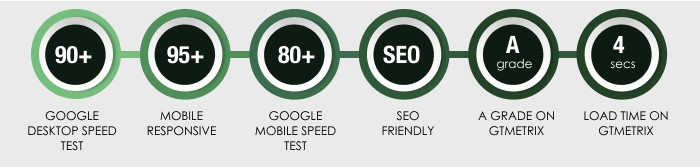
GTmetrix is a valuable tool for monitoring your website’s performance. It provides actionable insights and recommendations for speeding up your OpenCart store. Regularly check your GTmetrix scores and address any issues it highlights.
14. Optimize for Mobile
Mobile optimization is crucial, as an increasing number of users shop on mobile devices. Ensure your OpenCart store is responsive and loads quickly on smartphones and tablets.
15. Ongoing Testing and Improvement
Speed optimization is not a one-time task; it requires continuous monitoring and improvement. Regularly test your site’s performance using tools like GTmetrix and Google PageSpeed Insights and make necessary adjustments.
Drive Conversions with a Speedy OpenCart Site: Top Optimization Strategies
In conclusion, speed optimization is paramount for the success of your OpenCart store. A fast-loading website not only improves user experience but also boosts search engine rankings, which can lead to increased traffic and sales.
OpenCart Performance Optimization
By implementing the strategies outlined in this guide, such as cache optimization, content delivery, database table optimization, and SEO improvements, you can supercharge your OpenCart store’s performance and unlock its hidden potential. Remember, in the competitive world of e-commerce, a lightning-fast website can be the key to your online store’s success.